
 Ever felt that LEDs are a little 'cold'
or 'plasticky'? Do you yearn for that warm, comforting glow that only ionized gas behind
glass can provide? Do you have some nixie tubes gathering dust in your junk box (or in
long-forgotten test equipment)? Well, now you can bring them back to life!
Ever felt that LEDs are a little 'cold'
or 'plasticky'? Do you yearn for that warm, comforting glow that only ionized gas behind
glass can provide? Do you have some nixie tubes gathering dust in your junk box (or in
long-forgotten test equipment)? Well, now you can bring them back to life!
Build a Nixie Tube Digital Clock 


Warning! As this design uses a transformerless power supply, the whole circuit is at mains potential. Disconnect before making any adjustments etc. If you need to use an oscilloscope or other grounded instrument for debugging, the circuit MUST be operated through an isolating transformer. The finished design MUST be enclosed in a suitably insulated case, and if pushbuttons are used instead of reed switches for time-setting, they must have mains rated insulation.
This information is provided 'as is'. Readers should only attempt to build this design if they are competent at electronics assembly and understand the dangers of mains voltages. No responsibility is accepted for any damage, injury or death (however serious) or disruption of the space-time continuum caused by anything remotely connected to this website.
A professional double-sided, through plated PCB is now
available for this design - Please see here for more
details. Please note that I cannot supply ready-built boards or clocks. If
the idea of building your own scares you, check Logic
Applied, Neontime Sphere Cosmodog wps Cathode Corner Dodocus Karlsson (click on 'living') , mapsevoli , nixieclock.net
for ready-made ones or kits.
Another Nixie clock here. Have you
built a nixie clock ? - add it to the Nixie Clock Gallery
More info
on building nixie clocks, including a seven-segment to nixie converter for modifying
LED clocks. An Online
nixie Clock. Nixie tube & driver sources and data
Nixie clock emulator for
Windows Nixie clock article
in IEEE Spectrum magazine. A nixie tube
cable TV box . An
All-Valve nixie clock
This design uses no exotic or obsolete components other than the nixie tubes themselves. It was designed to be very compact, and does not use a mains transformer, allowing it to be built into a nice small case. It's designed for 230v (220-240V) mains operation, but can be modified for 115v (110-120V), and can be configured for 50 or 60Hz supplies.
Component cost should be well under UK£10/US$15 (excluding nixies). If it costs you much more, you're shopping in the wrong place!
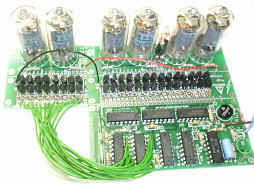
The artwork for a PCB design can be downloaded, which can be built either 'flat' (above centre image), or cut in two and 'folded' (above right) to make a very compact unit. An additional version is available which comprises 2 stacked boards under the tubes (see pics at the bottom of the page).
To avoid the need for unsightly buttons on the case (and the need to isolate the mains voltage from the user), reed switches are used for the time-setting function, these being operated by holding a magnet against the case, near the appropriate switch. (Any excuse to get some more glass bits on the PCB...!)
Circuit description
Click Here for .PDF file of the circuit schematic (39K). This should print legibly at A4 (Letter) size.
If you don't care how it works, skip this section, but please don't, as
you may learn something...
The circuit uses CMOS 4017 counters to divide the 50Hz (or 60Hz) mains frequency down to
1Hz, and also to generate the 1-of-10 drive signals to drive the tubes. The high-voltage
driver stages use readily available low-cost MPSA42 transistors. IC drivers (like the TTL
74141) were not used for reasons of cost, availability and power consumption.
The 230V mains supply is rectified to produce an unsmoothed +340V peak-to-peak supply for the nixie tubes. Smoothing is not required as the 100Hz flicker will not be visible, it reduces the avarage power dissipation in the anode resistors R5-8, and avoids the need for a physically large capacitor. For 115V operation, a voltage-doubler is required, producing a fairly smooth +250VDC supply. The low-voltage supply for the CMOS ICs is derived from a resistor/zener dropper R1/2 and D1. (2 resistors are used to avoid exceeding the resistors' voltage rating). One or two NE-2 lamps provide a flashing dot or colon indicator. You could alternatively use the decimal point of the 'hours' nixie, but you will probably need to connect it via R3 to match the digit brightness, and you may find that the brightness of the hours digit fluctuates slightly as the dot switches on and off.
The 50Hz signal is current-limited by R11/12, and buffered by U8B, which is just being used as a buffer stage to buffer the high-impedance 50/60Hz signal for use by the fast-set switch. U8B's CMOS input static-protection diodes clamp the voltage to the supply rails. C5 filters out fast mains transients and noise. C2/R10 and D5 reset the hours count to '1' when it reaches '13'. R9 allows the 'minutes' clock signal to be overridden by the time set buttons. R13 and C6 form a low-pass filter to reduce the effect of switch-bounce on the slow-set switch.
Note the different connection of the hours tube to U1, as hours count from 1 to 12, whereas the minutes count from 0 to 59.
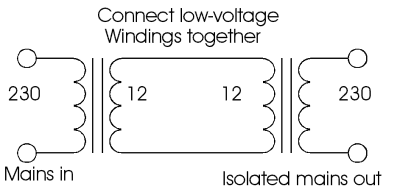 As the circuit is not isolated from the
mains, it is ESSENTIAL to use an isolating transformer if you need to connect an
instrument such as an oscilloscope. As the circuit draws only a small current, you can
easily make a suitable isolating transformer using two identical (i.e. same secondary
voltage) small low-voltage mains transformers with the secondaries connected together.
When connected via an isolating transformer, you can earth the 0V signal ground line. Remember that there will still be dangerous voltages on the board!
As the circuit is not isolated from the
mains, it is ESSENTIAL to use an isolating transformer if you need to connect an
instrument such as an oscilloscope. As the circuit draws only a small current, you can
easily make a suitable isolating transformer using two identical (i.e. same secondary
voltage) small low-voltage mains transformers with the secondaries connected together.
When connected via an isolating transformer, you can earth the 0V signal ground line. Remember that there will still be dangerous voltages on the board!
PCB
Information is provided here to make your own PCB for this design. The design can be built as a single PCB, or the tube section can be seperated to make a compact unit with the electronics vertically mounted behind the tubes. The main part of the board can also be seperated and hard-wired to tubes with different pinouts to the ones I used.
The display part of the PCB is designed for the tubes I had available, which are fairly
standard size 'generic' ones with no maker's name. I have subsequently found that ITT
GNP-17A and Hivac XN11 tubes have the same pinout as the ones I used. They have 12 pins
(0-9, point, anode). Some nixies have 13 pins - the extra electrode is a 'primer', used to
maintain ionisation to avoid flicker on multiplexed displays. This electrode is not
necessary in this application and can be left unconnected. The PCB component layout
drawing has the pinouts of the tubes I used marked.
The leads of wire-ended tubes with different pinouts can usually be pre-formed to fit the
PCB, but you won't be able to seat the tube hard against the PCB. For tubes with solid
pins, you'll probably need to either make up your own display PCB section, or hardwire
them with or without sockets. See later for a hint on making DIY sockets.
The PCB is single-sided, and was designed to be very compact, and therefore has a rather high track density, so it needs to be made very carefully. See here for lots of info on making good-quality homebrew PCBs.
Pcb data files for download
(PCB files corrected 31/10/99 - 60Hz link goes to pin 5, was pin 6 on old PCB)
Component layout drawing : nxlayout.pdf (192K).
PCB artwork (x1, view from component side, so print side faces copper) :
nixpcb.pdf (87K) PDF format - ensure 'fit to page' is off
when printing. you may need to scroll to bottom of page to see image.
nixgrb.zip (10K) Zipped Gerber photoplot file (embedded
apertures)
Alternative version - PCB is cut at a different point so both PCBs end up the same size, to allow PCBs to be stacked underneath tubes - see images at bottom of page. Component layout drawing nixlay2.pdf (192K) PCB artwork nix2pcb.pdf (90K)
nixdxfs.zip (51K) Zipped DXF files of both versions of the PCB. Note that the quality of DXF-Import in many software packages is poor, so you may have problems with line-widths & pad shapes. Use the PDF if you can.
Email if you need a different file format & I'll see what I can do.
The PCB artwork must be printed at a resolution of at least 600dpi. Check the printout
for accurate size using the dimensions printed outside the board area. If you can't get a
sufficiently good quality printout with your printer, print the PDF file using a
Postscript printer driver, configured to print to a file, and take this file to a
typesetting beaurau (look under 'desktop publishing services' in the Yellow Pages) and ask
for a positive film - this should cost about UK£5 (US$8), and will produce an excellent
quality transparency for UV exposure.
Drill sizes are all 0.8mm except D4 (1.0mm), and the holes for the mains input (1.2mm or
to suit cable). If building the 'folded' version, drill the interconnect pins to 1.0mm and
use a standard 0.025" square-post header strip.
All the parts for this design (apart from the nixies) can be obtained from any normal component suppliers including Maplin, RS, Farnell and many others worldwide.
See here for a list of possible nixie sources and pinout information.
Parts list
Parts marked * are for 115V doubler version only, parts marked + for 230V version (or 115V via transformer).
| Qty | Ref | Description | Typical mail-order price each, UK Pounds (multiply by approx 1.5 for US$) |
| 7 | U1-7 | 4017 (MC14017, CD4017, HEF4017 etc.) | 0.50-0.80 |
| 1 | U8 | 4013 (MC14013, CD4013, HEF4013 etc.) | 0.30-0.50 |
| 1 | D1 | 4V7 (=4.7 volt) 400mW Zener diode | 0.05-0.10 |
| 2 | D2*,D3* | 1N4005,6 or 7 diode | 0.05-0.10 |
| 1 | D4+ | W04,5,6 or7 bridge rectifier (1 Amp, 400V or more) | 0.30-0.50 |
| 1 | D5 | 1N4148 or 1N914 signal diode | 0.02-0.05 |
| 1 | C1 | 100uF 10V electrolytic capacitor, radial pins | 0.05-0.10 |
| 3 | C2,5,6 | 1nF ceramic capacitor, 0.1" pin spacing NB C2 may not be required - fit only if hours don't roll over correctly (see notes later) |
0.02-0.08 |
| 2 | C3*,C4* | 2.2uF 350VDC electrolytic or polyester/polyprop. capacitor. (not 250v as shown on schematic). | 0.30-0.60 |
| 3 | C7-9 | 100nF ceramic capacitor, 0.2" pin spacing | 0.02-0.08 |
| 3 | R1,2,9 | 100K 0.125 or 0.25 watt resistor, 5% | 0.01-0.02 |
| 2 | R3,4 | Resistor to suit colon neons, around 680K 1/4W See below | 0.01-0.02 |
| 4 | R5-8 | Resistor to suit nixies, around 47K, see below | 0.01-0.02 |
| 2 | R10,13 | 10K 0.125 or 0.25 watt resistor, 5% | 0.01-0.02 |
| 2/3 | R11,12, R14* | 1M 0.25 watt resistor, 5% | 0.01-0.02 |
| 1 | R15* | 220R 0.25 watt resistor, preferably fusible (flameproof) type 5% | 0.05-0.10 |
| 1 | R16+ | 1K 0.25 watt resistor, preferably fusible (flameproof) type 5% | 0.05-0.10 |
| 28 | R17-44 | 33K 0.1 or 0.125W sub-miniature resistor 5% | 0.01-0.02 |
| 28 | Q1-28 | MPSA42 transistor (300V Vceo, TO-92) | 0.05-0.15 |
| 4 | V1-4 | Nixie tubes | |
| 2 | LP1,2 | NE-2 or similar neon bulb | 0.20-0.30 |
Assembly Notes
If you intend to build the PCB as a 'vertical' version, it is suggested that you build & test it as a single PCB, for ease of access to components, then cut the board into the two parts when you've got it working.
The PCB has a high track/component density, and needs careful soldering with a fine
tip. Check carefully for shorts, ESPECIALLY from the high-voltage anode supply (junction
of R5-8), as a short from this line could cause severe damage or fire!
There are several wire jumper links on the PCB. these are made with tinned-copper wire (or
component lead offcuts). If using a reel of TC wire, you can get nice straight links by
stretching the wire slightly - this is easy to do if you unroll a foot or so, and pull it
tight with pliers, then cut to short lengths.
Take care when bending the leads of the reed switches - it is very easy to crack the
glass. Use fine-nosed pliers to hold the lead between the glass and the bend.
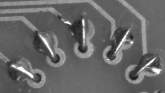 If you mount the
nixies close up against the PCB, do not solder the leads at the point where they come
through the PCB, as this can cause mechanical stress and cracking. Instead, fold the wires
over and solder to the larger outer pads, as shown on the right.
If you mount the
nixies close up against the PCB, do not solder the leads at the point where they come
through the PCB, as this can cause mechanical stress and cracking. Instead, fold the wires
over and solder to the larger outer pads, as shown on the right.
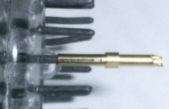 Many nixies have short, solid pins instead of wires - do not attempt to
solder directly to this type of tube pin, as you run a high risk of cracking the glass. To
connect to tubes like this, the socket contacts from a dismantled a 'D' type socket (the
type with turned pins, not the cheap stamped-pin ones) provide an easy method. You could
either just hardwire to the pins, make a PCB to hold them, or epoxy them into holes
drilled into a plastic or fibreglass sheet to make a proper socket.
Many nixies have short, solid pins instead of wires - do not attempt to
solder directly to this type of tube pin, as you run a high risk of cracking the glass. To
connect to tubes like this, the socket contacts from a dismantled a 'D' type socket (the
type with turned pins, not the cheap stamped-pin ones) provide an easy method. You could
either just hardwire to the pins, make a PCB to hold them, or epoxy them into holes
drilled into a plastic or fibreglass sheet to make a proper socket.
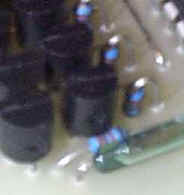
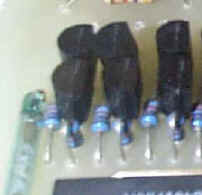 The driver area is very densely packed - use
subminiature (1/8 watt) 33K resistors if possible. See the close-ups (right). If you use
larger 1/4 watt resistors, you may need to space the transistors off the PCB slightly.
The driver area is very densely packed - use
subminiature (1/8 watt) 33K resistors if possible. See the close-ups (right). If you use
larger 1/4 watt resistors, you may need to space the transistors off the PCB slightly.
It may be necessary to experiment with the value of the anode resistors R5-8, so don't
solder them all in - just tack R8 in place, and check that the tube brightness is
acceptable. If you see any significant purple 'haze' in the tube, or parts of the tube
other than the digits lighting, the current is too high, and you should increase the
resistor value. Avoid the temptation to run the tubes too brightly, as this will make the
glass blacken and reduce their life considerably. Check for tube blackening after running
the clock for a few months. Recommended values to start with : 47K (R5-8), 680K (R3,4).
For the 115V voltage-doubler version, these will probably need increasing. If you are
using larger tubes, you will probably need to decrease R5-8, and possibly use higher
wattage versions (1 watt) to cope with the extra power dissipation.
If you have found suitable values for specific tubes and power supplies, please let me know. Values sent by other builders :
ZM1000/230VAC : 68K. National NL5859/115v with doubler 200-220K. Burroughs B5991/115v with
doubler:100K. Hivac XN11/240V:150K. 5807, 115v with doubler 100K.
The 4017 counters can power up in 'strange' count states. This means that on power-up, the clock may show an invalid time, or even multiple digits lit in one tube. Use the 'Fast Set' mode to increment the display until it is sensible. The counters in the divider network may also assume odd states, so the first 'minute' after power up could be either short or long! For optimum accuracy, wait until the minute display changes before setting the time.
One builder has reported a problem with the hours not resetting properly, i.e. going 9,10,11,12,3,4,5. I think this was due to timing differeces between the makes of 4017 and 4013 used for U1 and U8. This was fixed by adding a 220pF capacitor between pins 15 and 16 of U1. (If you have this problem, you may find that a smaller value could be required, e.g. 100pF). Another person reported the hours count going 9,10,11,12,1,2,1,2 which was fixed by removing C2.
Thanks to Steven Rougier for this alternative fix for this issue : Disconnect pin 15 of
U1 from the rest of the circuit and connect it to
pin 5 of U8A via a 1n capacitor. Also, connect pin 15 of U1 to ground via a 10k resistor.
C2 and the 220pF are not required. The clock will then always roll over correctly since U1
will reset U8B and U8B will then reset U1, in sequence rather than in parallel. With the
parallel situation, the first i.c. to reset removes the reset signal from the other and
unreliable results can occur.
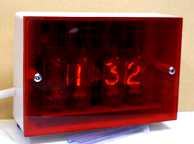 A nice easy way to make a
case is to get a standard plastic project box of an appropriate size, and replace the lid
with a piece of light-red or orange tinted clear plastic, cut to the correct size. For UK
builders, an alternative might be to to use a surface double 13 amp mains socket back-box.
If you can't find tinted plastic (sign shops are a good source), use clear plastic, with a
sheet of cellophane or stage-lighting gel filter material behind it. If you want to make a
'window' instead of having the whole front clear, mask a suitable rectangle with tape and
spray the inside of the plastic sheet black. A black card placed behind the tubes will
also improve appearance.
A nice easy way to make a
case is to get a standard plastic project box of an appropriate size, and replace the lid
with a piece of light-red or orange tinted clear plastic, cut to the correct size. For UK
builders, an alternative might be to to use a surface double 13 amp mains socket back-box.
If you can't find tinted plastic (sign shops are a good source), use clear plastic, with a
sheet of cellophane or stage-lighting gel filter material behind it. If you want to make a
'window' instead of having the whole front clear, mask a suitable rectangle with tape and
spray the inside of the plastic sheet black. A black card placed behind the tubes will
also improve appearance.
Remember that the entire circuit is at mains potential, so take care that any
external screws cannot come into contact with the circuitry. If you use pushbuttons
instead of reed switches, they MUST be mains-rated, and be sufficiently well constructed
that minor damage (e.g. cap coming off) will not cause live parts to be exposed.
Suggestions for modifications
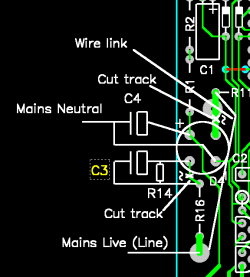
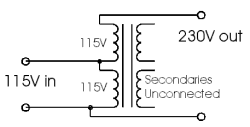 115V mains operation A voltage
doubler is required to get sufficient voltage for the tubes, and this is shown on the
schematic, but not included on the PCB. (it is included on the ready-made PCB) Note
that the schematic shows C3,4 as 250V rated - this should be 350V. You can add
the doubler to the PCB as a slight 'bodge', as shown on the left. This uses half of the
bridge rectifier for the two diodes D2,3.
115V mains operation A voltage
doubler is required to get sufficient voltage for the tubes, and this is shown on the
schematic, but not included on the PCB. (it is included on the ready-made PCB) Note
that the schematic shows C3,4 as 250V rated - this should be 350V. You can add
the doubler to the PCB as a slight 'bodge', as shown on the left. This uses half of the
bridge rectifier for the two diodes D2,3.
Alternatively (right), use a small dual-primary mains transformer wired as a 115-to-230v
autotransformer (secondary unconnected), this will allow the PCB to be used unmodified.
Power draw is low, so any transformer larger than about 4.5VA will do, and you may be able
to fit it into a mains adapter ('wall wart') type casing.
Seconds display : For a six digit clock with seconds, connect
another two nixie tubes to the outputs of U5 (secs) and U6 (tens), via another 16 driver
stages. You'll need a way to reset the seconds count when setting the time - I'll let you
figure this out (email me if you really want
to do this & can't work out how to!) UPDATE: I've just noticed
that the divider circuit isn't configured to be able to do this - it divides by 6 then
ten, but should do it the other way round. This is easy enough to fix - swap the RST pin
connections between U5 and U6, i.e. connect U5 RST to ground, and U6 RST to U6 Q6. Connect
U6 CLK to U5 CO instead of Q0. Take R9 to U6 Q5 instead of CO. Alternatively, make up just
the minutes section of a second PCB, with just U2/U3 and their respective drivers fitted,
and use this as the seconds divider and display, omitting U5/6 from the main PCB.
There is a revised schematic showing the correct divider arrangement, together with a
means of adding a 'seconds hold' function to allow exact time setting in the schematic for the ready-made pcb.
24 hour display format : Change connections from U1 and the 'Hours' nixie to match those for U3 (we need to count 0..23 instead of 1..12). Replace U8A with another 4017 (U9), with outputs Q1 and Q2 connected to the '1' and '2' electrodes of the '10 hours' tube, using an extra driver stage along with the current '1' stage. Connect the RST input of U9 to the RST input of U1. Connect the top end of the R10/C2 pair to the 'Q4' output of U1 (so it resets at 24), and the cathode of D5 to the Q2 output of U9.
AM/PM display You need an extra 4013 to act as an AM/PM latch. Connect D to /Q on the new 4013, and tie the S and R pins low. Connect a 10K resistor from U1 pin 2 to the new 4013's clock pin. This will generate a rising edge whenever the hours digit goes to "2", i.e. at "12" and "02." Connect a diode with the cathode (ring) to U8A pin 1 and the anode to the new 4013's clock pin. This will hold the clock low (inactive) when the 10-hours digit is off, so you only get a clock pulse on "12" and not "02." Connect the Q and /Q pin of the new 4013 each to their own driver transistor network. Use these to each drive one of two /PM AM neon bulbs, which will toggle at midnight and noon. Connect S,R,D and Clock inputs of the unused half of the 4013 to ground, otherwise they will float and draw excess current.
Radio controlled timebase WWVB (USA) check out Jeff Thomas' site for a mod to use the innards of a cheap radio-controlled clock as a timebase. This method should also be viable for the UK 60KHz and German DCF77 time standards, using locally bought clocks.
Automatic dimming See Here for a neat mod to dim the tubes according to ambient light level.

Here are a few assorted pictures to clarify any details not obvious from the layout drawing. Note that there are a couple of slight differences in the positions of a few of the components due to errors on the prototype PCB, and only one of the 'colon' neons is fitted.
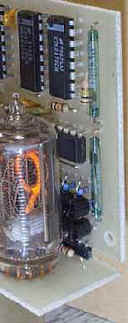
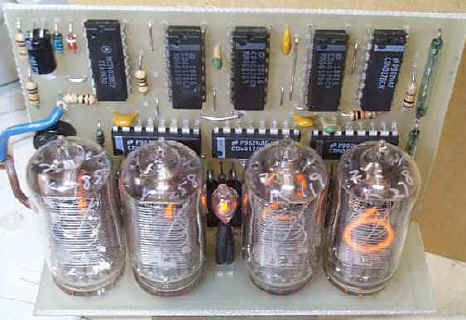
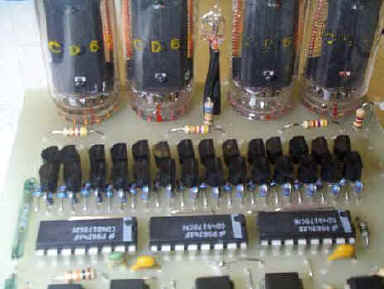
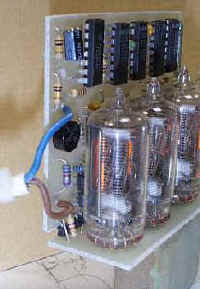
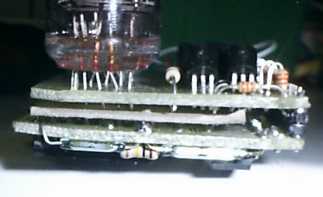
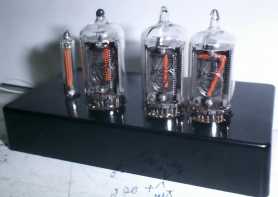
Alternative stacked-PCB version (I only had 3 tubes so I used a long NE-2 bulb for the 10 hours digit - this bulb and the tubes were scavenged from an old nixie DVM module I picked up at a radio junk sale). This PCB has been chopped about a bit to fit my case! Note cardboard insulating spacer between PCBs.

Notes on the ready-made PCB
Ready-made PCBs are available from Gary Kaufman in the USA - please contact him direct at nixie@the-planet.org
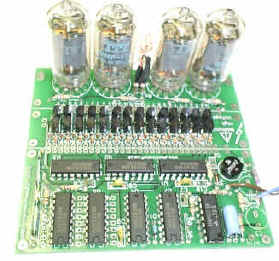
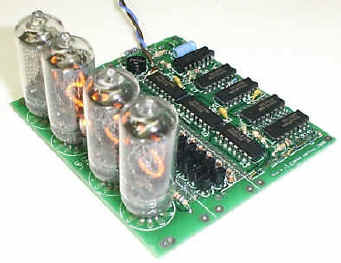
The design for this PCB has been enhanced from the original version to make it as flexible as possible. Changes include the addition of mounting holes, optional voltage doubler for 115v operation, two possible cut-points to subdivide the PCB to suit various mechanical arrangements, and a rearranged divider and connection pads to make it easier to add seconds digits for a 6-digit version.
If you will be using this PCB, please download nixiepcb.zip (400K), which contains PDF component layout drawings and a revised schematic for the PCB.
The parts list is as shown above, with the following changes : R14 deleted (R14 is now only used for the 6-digit seconds option). C10 (100 to 220pF) added - this may be required with some makes of U1/U8 if the hours don't reset correctly from 12 to 1. Note that the legend for C5 is missing from the silkscreen - it's next to R12
The PCB can be built up as a 115 or 230v version. See Voltage_Options.pdf
(in nixiepcb.zip) for component differences.
Note that only one of these two options can be fitted!
The PCB can be cut at one or both of two possible lines for flexibility of packaging - see
Layout_Options.pdf (in nixiepcb.zip) for some suggested layouts.
 Seconds option
The PCB has pads to provide the signals to drive another 2 nixies for a
seconds display. These signals are connected to another sixteen driver stages to drive the
2 tubes. These 2 digits can be built on a second PCB, cut-down as required. Download seconds.pdf for a diagram of the required interconnections.
For time setting, in addition to the normal fast/slow set switches, an additional switch
is used which freezes the seconds count.A 100nF capacitor may be required across the
'Seconds Hold' switch, depending on the type of switch used, to avoid the count jumping
when the switch is operated.
This design can, with some small mods, also be used to drive low-voltage filament displays, like projection units or the light-guide ones shown below. Assuming a 12V filament display, the basic changes are to use BC548's instead of MPAS42 drivers (note different pinout), and reduce the base resistors to about 2K2. The circuit is run from a 9VAC 500mA transformer fed into D4, R1/2/16 are bypassed, D1 omitted and C1 increased to 1000uF 16V. The CMOS chips will now run at 12V (maximum is 15V so be careful if using higher voltage displays).

